
 English
  Dutch
Dutch  German
  Spanish
 Internet backup failover (better known as 4G backup) means that your connection will automatically switch to backing up your Internet service if your main connectivity service fails. It acts as a second-line to your main internet connection.
Adding internet backup to your current fiber-optic Internet will provide the redundancy needed to combat future outages in your business. This solution includes using the 4G 5G LTE data plan. LTE failover is a data-based plan, similar to what you would have with a smartphone.
The LTE service you get with this fail-over solution includes an agreed amount of data.
Summarized: when your cable network fails, your router changes to the wireless network you’re also using on your mobile phone.
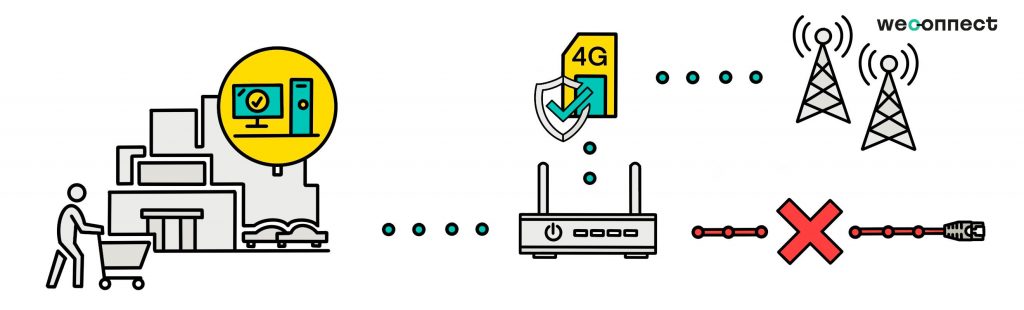
How does 4G backup / internet failover work?
Once a business grade 4G 5G router is installed, the router can identify when a fixed Internet connection has failed. Once it detects the primary service has been disconnected, the modem automatically switches over to the 4G Backup service to support Internet connectivity over mobile broadband. Mobile internet is facilitated by the inbuild SIM covering multiple networks per country.
4G Backup enables the router to re-establish Internet connectivity to supply the LAN site and ensures the key processes of your business. A short period of down-time will be experienced as this re-routing takes place.
In reverse, the same will happen when the router detects a successful (previously established) fixed Internet connection. It will automatically switch from the 4G Backup service to the primary fixed Internet service, after a short delay.
Why do I need 4G back up?
Internet failover is necessary for companies because keeping their business connected is essential for a successful operation of the company. Start by listing all the critical processes that require digital connectivity, and you’ll get an idea of why businesses need backup Internet. For companies that use fiber-optic Internet, you could diversify by using a 4G 5G connection as a backup.
Critical processes and systems that probably need internet in your company:
- POS (point-of-sale) system
- Security system
- Online order system
- Stock and inventory system
How do I set-up 4G backup / internet failover.
Take the steps described below and the installation of your 4G Backup / internet failover system should go successful. Need help, as a weconnect client you can always contact our support.
- Insert the SIM card into the micro SIM card slot;
- Connect the LAN port to an Ethernet port on your PC and boot the modem;
- The modem distributes an IP address to your computer via DHCP(Dynamic Host Configuration Protocol);
- Go to the user admin, log in with the default password listed at the bottom of your modem and set your APN(Access Point Name);
- Then click to connect to the mobile network;
You will see the strength of the signal by means of the LEDs on top of your modem. You now have a router that has internet via 4G. You can connect it to your LAN(Local area network) – WAN(Wide area network) router or you can put in the fixed line as a primary.
Once done you can go to the menu settings and set the fixed line as Primary Wired WAN, and the 4G LTE as Mobile WAN failover. When weconnect delivers the solution as a managed service to you, a fully configured service will be dispatched or installed. This makes it an easy plug and play self-installation, or we will arrange a complete installation on site and set you up in order to be always on.
The best 4g backup / internet failover routers
To get a uniform solution covering international locations we selected a set of business and carrier-grade routers where all of them have great functionality of their own. All of them cover the most or all of your international connectivity needs.
- Sierra Wireless. The AirLink® LX60 is the industry’s first LTE and LTE-M / NB-IoT router for commercial and enterprise applications. The LX60 offers “out-of-the box” connectivity that is simple to install, and easy to manage providing your equipment or business with a primary or backup LTE connection. The LX60 provides purpose-built, secure, reliable, managed LTE networking in IoT applications such as Building Automation, Digital Signage, Taxis, ATMs, Kiosks and Point-of-Sale terminals. The LX60 is designed to meet the environmental and performance requirements of a diverse range of equipment in building, industrial and mobile locations, delivering superior reliability and uninterrupted operation in fixed, indoor and protected outdoor environments. LX60 is also available with optional Wi-Fi + GNSS and rated for shock, vibration and vehicle power environments meeting the demands of light commercial and taxis requiring connectivity. Find out more on our selected hardware page.


